


Read summarized version with
 ChatGPT
'%3e%3cpath%20fill-rule='evenodd'%20clip-rule='evenodd'%20d='M16.4875%200V6.06H18.75V14.6833H16.3042V20L10.44%2014.8383V19.9592H9.53083V14.8325L3.66%2020V14.6125H1.25V5.99H3.65333V0L9.53083%205.41167V0.158333H10.4392V5.56667L16.4875%200ZM10.44%207.53667V13.6358L15.395%2017.9975V12.0333L10.44%207.53667ZM9.52417%207.47L4.56917%2011.9683V17.9975L9.52417%2013.6358V7.47083V7.47ZM16.3042%2013.7867H17.8408V6.9575H11.2167L16.3042%2011.5742V13.7867ZM8.81917%206.88667H2.15833V13.7158H3.65833V11.5692L8.81833%206.88583L8.81917%206.88667ZM4.5625%202.06333V5.98833H8.825L4.5625%202.06333ZM15.5783%202.06333L11.3158%205.98833H15.5783V2.06333Z'%20fill='black'/%3e%3c/g%3e%3cdefs%3e%3cclipPath%20id='clip0_4212_18220'%3e%3crect%20width='20'%20height='20'%20fill='white'/%3e%3c/clipPath%3e%3c/defs%3e%3c/svg%3e) Perplexity
Perplexity'%3e%3cpath%20d='M9.996%2019.992C9.996%2018.6068%209.73182%2017.3074%209.19632%2016.0936C8.68224%2014.8798%207.96824%2013.8159%207.0686%2012.9163C6.16896%2012.0166%205.11224%2011.3098%203.89844%2010.7957C2.68464%2010.2602%201.38516%209.996%200%209.996C1.38516%209.996%202.68464%209.73896%203.89844%209.21774C5.11224%208.68224%206.1761%207.96824%207.0686%207.0686C7.96824%206.16896%208.6751%205.11224%209.19632%203.89844C9.73182%202.68464%209.996%201.38516%209.996%200C9.996%201.38516%2010.253%202.68464%2010.7743%203.89844C11.3098%205.11224%2012.0238%206.1761%2012.9234%207.0686C13.823%207.96824%2014.8798%208.68224%2016.1007%209.21774C17.3145%209.73182%2018.614%209.996%2019.9991%209.996C18.614%209.996%2017.3145%2010.2602%2016.1007%2010.7957C14.8869%2011.3098%2013.823%2012.0166%2012.9234%2012.9163C12.0238%2013.8159%2011.3098%2014.8726%2010.7743%2016.0936C10.2538%2017.327%209.98905%2018.6533%209.996%2019.992Z'%20fill='url(%23paint0_radial_4212_18233)'/%3e%3c/g%3e%3cdefs%3e%3cradialGradient%20id='paint0_radial_4212_18233'%20cx='0'%20cy='0'%20r='1'%20gradientUnits='userSpaceOnUse'%20gradientTransform='translate(-1.13275%205.96185)%20rotate(18.68)%20scale(21.2772%20170.46)'%3e%3cstop%20offset='0.07'%20stop-color='%239168C0'/%3e%3cstop%20offset='0.34'%20stop-color='%235684D1'/%3e%3cstop%20offset='0.67'%20stop-color='%231BA1E3'/%3e%3c/radialGradient%3e%3cclipPath%20id='clip0_4212_18233'%3e%3crect%20width='20'%20height='19.992'%20fill='white'/%3e%3c/clipPath%3e%3c/defs%3e%3c/svg%3e) Gemini
Gemini'%3e%3cpath%20d='M3.92888%2013.2962L7.86008%2011.0903L7.92585%2010.8981L7.86008%2010.7918H7.66782L7.01009%2010.7513L4.76369%2010.6906L2.81581%2010.6097L0.928632%2010.5085L0.453044%2010.4073L0.0078125%209.82039L0.0533475%209.52694L0.453044%209.25879L1.02476%209.30939L2.28962%209.3954L4.18692%209.52694L5.56309%209.60789L7.60204%209.82039H7.92585L7.97138%209.68884L7.86008%209.60789L7.77407%209.52694L5.811%208.19631L3.68603%206.78978L2.57295%205.98027L1.97088%205.57045L1.66731%205.18593L1.53577%204.34607L2.08219%203.74399L2.81581%203.79459L3.00301%203.84518L3.74674%204.4169L5.33541%205.64634L7.40979%207.1743L7.71335%207.42727L7.83478%207.34126L7.84996%207.28055L7.71335%207.05287L6.5851%205.01391L5.38095%202.93954L4.84465%202.07943L4.70298%201.56337C4.65239%201.35087%204.61697%201.17379%204.61697%200.956236L5.23928%200.111308L5.58332%200L6.41307%200.111308L6.76218%200.414875L7.27824%201.59373L8.11305%203.45054L9.40827%205.97521L9.78773%206.72401L9.9901%207.41715L10.066%207.62965H10.1975V7.50822L10.3038%206.08652L10.5011%204.34101L10.6934%202.09461L10.7591%201.46218L11.0728%200.703263L11.6951%200.293448L12.1808%200.526183L12.5805%201.0979L12.5249%201.46724L12.2871%203.01037L11.8216%205.42879L11.5181%207.04781H11.6951L11.8975%206.84543L12.7171%205.75765L14.0933%204.03744L14.7005%203.35441L15.4088%202.60056L15.8641%202.24134H16.7242L17.3567%203.18239L17.0733%204.15381L16.1879%205.277L15.4543%206.22818L14.4019%207.64483L13.7442%208.77814L13.8049%208.86921L13.9618%208.85403L16.3397%208.34809L17.6248%208.11536L19.1578%207.85226L19.851%208.17607L19.9269%208.50493L19.6537%209.17784L18.0144%209.5826L16.0918%209.96711L13.2282%2010.6451L13.1927%2010.6704L13.2332%2010.721L14.5234%2010.8424L15.0749%2010.8728H16.4257L18.9403%2011.06L19.598%2011.4951L19.9926%2012.0263L19.9269%2012.4311L18.915%2012.9471L17.5489%2012.6233L14.3615%2011.8644L13.2686%2011.5912H13.1168V11.6823L14.0275%2012.5727L15.6972%2014.0804L17.7867%2016.0233L17.893%2016.5039L17.6248%2016.8834L17.3415%2016.8429L15.5049%2015.4617L14.7966%2014.8394L13.1927%2013.4885H13.0865V13.6302L13.4558%2014.1715L15.4088%2017.106L15.51%2018.0066L15.3683%2018.3L14.8624%2018.4771L14.3058%2018.3759L13.1624%2016.7721L11.9835%2014.9658L11.0324%2013.3468L10.916%2013.4126L10.3544%2019.4586L10.0913%2019.7673L9.48416%2020L8.97821%2019.6155L8.71006%2018.9932L8.97821%2017.7637L9.30202%2016.1599L9.56511%2014.8849L9.80291%2013.3013L9.94457%2012.7751L9.93445%2012.7397L9.81808%2012.7549L8.62405%2014.3941L6.80771%2016.848L5.37083%2018.386L5.02679%2018.5226L4.42977%2018.214L4.48542%2017.6625L4.81935%2017.1718L6.80771%2014.642L8.0068%2013.0736L8.7809%2012.168L8.77584%2012.0364H8.7303L3.44824%2015.4667L2.50718%2015.5882L2.10242%2015.2087L2.15302%2014.5864L2.34528%2014.384L3.93394%2013.2912L3.92888%2013.2962Z'%20fill='%23D97757'/%3e%3c/g%3e%3cdefs%3e%3cclipPath%20id='clip0_4212_18270'%3e%3crect%20width='20'%20height='20'%20fill='white'/%3e%3c/clipPath%3e%3c/defs%3e%3c/svg%3e) Claude
Claude'%3e%3cpath%20d='M7.77353%2012.0388L14.278%207.23827C14.5972%207.00347%2015.0534%207.09396%2015.205%207.46044C16.0048%209.38782%2015.6469%2011.7045%2014.0559%2013.296C12.4648%2014.8862%2010.2512%2015.2348%208.22684%2014.4407L6.01614%2015.4643C9.18686%2017.631%2013.0375%2017.0949%2015.4431%2014.6885C17.3517%2012.7811%2017.9424%2010.1807%2017.3896%207.83507L17.3941%207.83956C16.5927%204.39408%2017.5906%203.01744%2019.6366%200.202196C19.6839%200.135341%2019.7332%200.0676703%2019.7821%200L17.0908%202.6901V2.68113L7.7719%2012.04M6.43072%2013.2047C4.15521%2011.0323%204.54778%207.66916%206.48861%205.72874C7.92395%204.29299%2010.2773%203.7076%2012.3307%204.56815L14.5369%203.55024C14.1398%203.26326%2013.6303%202.95507%2013.0453%202.73738C10.4045%201.65058%207.24114%202.19113%205.09403%204.3362C3.02927%206.40055%202.37948%209.57493%203.49441%2012.2838C4.32765%2014.3078%202.9616%2015.7407%201.58578%2017.185C1.097%2017.6966%200.609043%2018.2098%200.214844%2018.752L6.42787%2013.2047'%20fill='black'/%3e%3c/g%3e%3cdefs%3e%3cclipPath%20id='clip0_4212_18265'%3e%3crect%20width='20'%20height='18.752'%20fill='white'/%3e%3c/clipPath%3e%3c/defs%3e%3c/svg%3e) Grok
GrokA visitor adds a laptop to their cart, and a popup suggests a perfect case they didn't find earlier. That single moment can bump your order value easily by up to 30% and improve customer satisfaction with the shopping experience.
Product recommendation popups work because—
They show the right product at the right moment, turning passive browsing into consideration and buying.
In this guide, I’m reviewing product recommendation popup examples from ecommerce businesses, the best practices for conversions, and a step-by-step setup on Shopify and other platforms.
Get started:
Personalize, publish, and improve sales
recommend products automatically
AI algorithm that learns from your store’s data and visitor behavior
improve your upsell, cross-sell, average order value, and shopping personalization

No cc required • 14-day free trial • Used by 1,500+ businesses
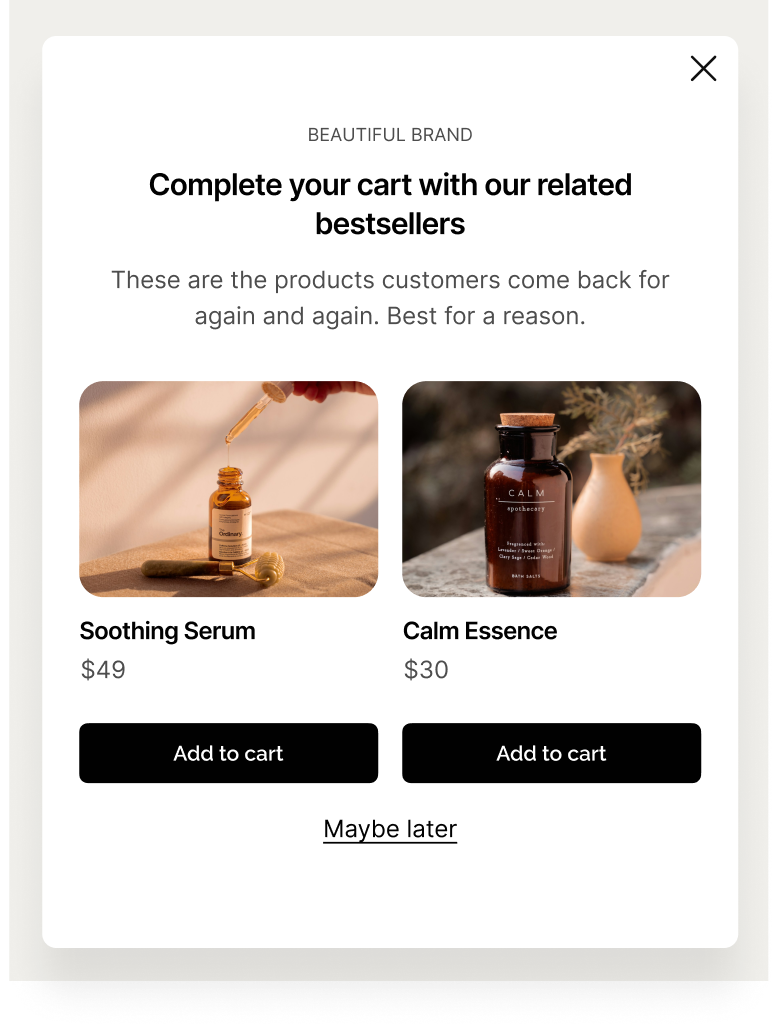
What are product recommendation popups?
A product recommendation popup is a type of automated ecommerce popup that suggests related products based on browsing history, purchase history, AI analysis of bestselling and/or trending products, or pre-added items. The idea is to help shoppers discover more products and improve sales and AOV.
Product recommendation popups appear at strategic moments such as when a visitor adds an item to the cart, when they’re browsing specific product pages, or are about to leave without buying. They use AI or pre-set targeting rules to generate personalized suggestions like "frequently bought together", trending picks, or bestsellers.
High-converting recommendation popups often have these four features in common:
Design: clean visuals, clear CTA buttons
Custom timing: the popup appears at the right moment in the shopping journey
Relevance: how well the suggested products match customer’s preferences
Add-to-cart features: possibility to add the product to the cart in one click


Just starting with your popup CRO strategy?
Use this 60-day popup implementation roadmap for ecommerce to set up a system that generates proven revenue.
Product recommendation popup templates

Cart Upsell Recommendations
Offer a perfect add-on right after “Add to cart"

Shopping Suggestions
Personalized recommendations displayed on your product pages

Product Recommendations on Exit
Boost ROAS with a last chance exit offer for paid traffic

Best practices for product recommendation popups: design, timing, triggers, and personalization
Add time or page delay
Popup personalization research shows that popups that appear on 2+ pages or after 20+ seconds on one page often outperform immediate popups because they catch visitors after they've had time to engage.
Test a 10-50 second delay or a 5-page delay as your baseline for recommendation popups. This is a good starting point because these delays reduced bounce by up to 45% and improved conversion increase of 39% on average.

Segment recommendations by the number of visits
If you’re choosing products manually, show different recommendations to different visitor groups. For example, new visitors should respond better to bestsellers combined with some social proof while returning visitors should engage more with recently viewed items or suggestions based on browsing history.
Test bestsellers and personalized suggestions for new and returning visitors. This is easy to set up in your popup platform’s audience targeting settings.

Expert tip: Advanced segmentation tactics for better personalization on Shopify
Use native Shopify data targeting in popup apps for rules like new vs. returning visitors, geo-targeting, or high-intent signals (e.g., 5+ pages visited, scroll depth >50%).

Localize your campaigns
If you’re selling your products in different countries, make sure your product recommendation popups are also written in the local language. When you’re done creating your campaign, choose to show it only to visitors coming from a certain country, region, or city.
For example, here are the settings for a campaign displayed only to France-based visitors:

Personalize by browsing, cart content, and shopping history
Essential personalization rules for ecommerce product recommendation popups:
Browsing history. Use URL targeting to show "You viewed these" or category-based recommendations (e.g., shoes after pants) to visitors who've viewed 2+ similar products; this tactic improved visitor engagement by up to 152%
Cart content. Offer "Frequently bought together" or complementary items (such as a belt with jeans) on cart pages or exit-intent—this can recover 10-25% of lost sales
Purchase history. Recommend upsells to repeat customers (e.g., premium upgrades or bundles) using customer tags in native Shopify targeting settings; segmenting by demographics or past AOV can improve cart additions by visitor by up to 4.5x.
Example—
This Shopify campaign will offer recommendations when a customer adds a specific product to the shopping cart:

Use AI to generate recommendations
This is a great product promotion popup best practice if you’re not sure which products to suggest to your visitors. Ecommerce popup platforms have AI targeting to allow you to show recommendations based on the analysis of buying signals, sales, browsing history, and other metrics.
It’s a more efficient way to create product recommendation popups because AI chooses suggestions and when to display them.
In Wisepops, for example, you can add AI recommendations in the popup builder:

Track goals and revenue automatically
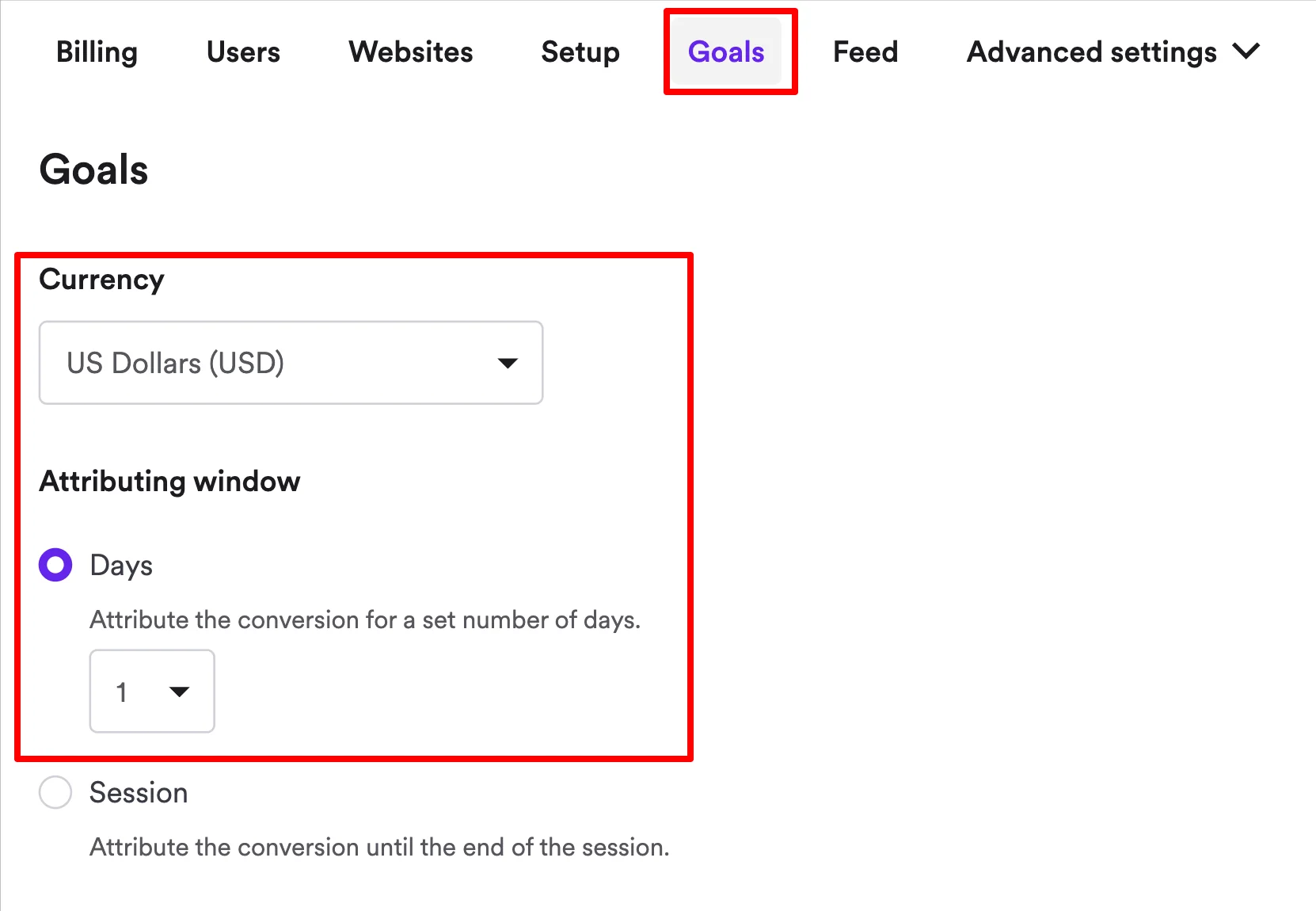
To track your product recommendation popup conversions, sales, and AOV impact, set up goal and revenue tracking in your popup platform. This means choosing your currency and the duration of the revenue attribution window (should be one or two days for proper attribution).
Example settings (Wisepops):
“If we added up the revenue claimed by all platforms we're using, it would look like we made about $15 million... We must be the most successful marketers in history!"
Use exit-intent as your “safety tactic”
Exit-intent popups with product recommendations appear only when someone's cursor moves toward the close button, so they don’t interrupt engaged visitors. This way, you’re preserving the shopping experience while offering one more chance to convert.
If you combine exit-intent with product recommendations (not just discounts or other incentives), the campaign will also feel more helpful than desperate.

A/B test products and popup placements
Test which products convert best, where the popup appears, and when it triggers. For example, our research showed that using action-oriented CTAs instead of conversational language increased conversion rates from 4.7% to 7.6% and improved revenue.
Ideas for A/B testing product recommendation popups:
AI-based recommendations vs manually added
Cornered popup placement vs centered
Best sellers vs recently viewed items
Page- vs time-delayed display

Learn more:
Product recommendation popup examples
Here are popup examples of high-converting product recommendation popups that ecommerce businesses use to grow sales and AOV:
Multi-step bestseller recommendation popup
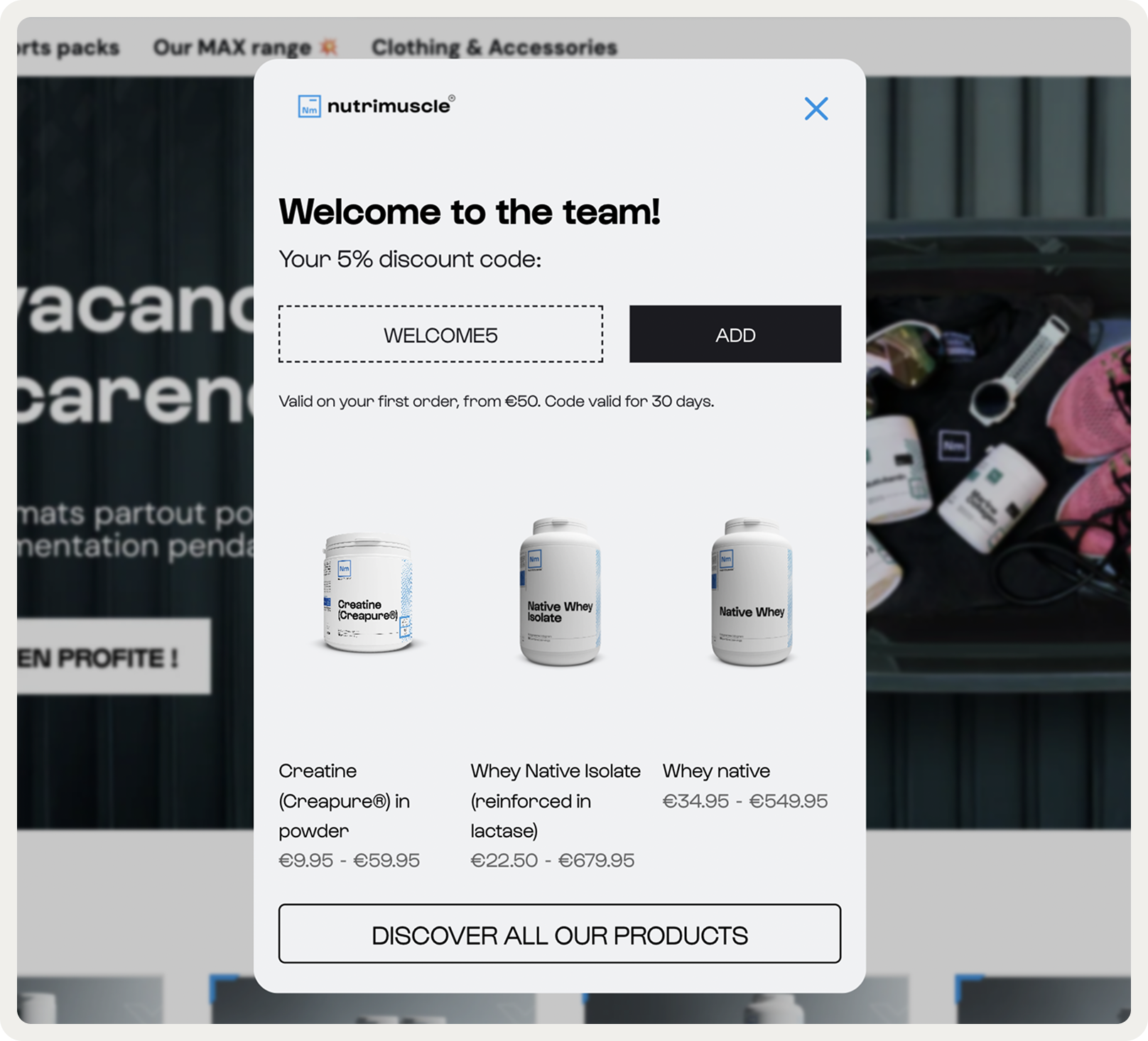
This example shows top-selling products to new visitors without browsing history. Consider this idea to improve email capture and sales with welcome and discount popups for new visitors where you lack behavioral data to personalize against.
Example—
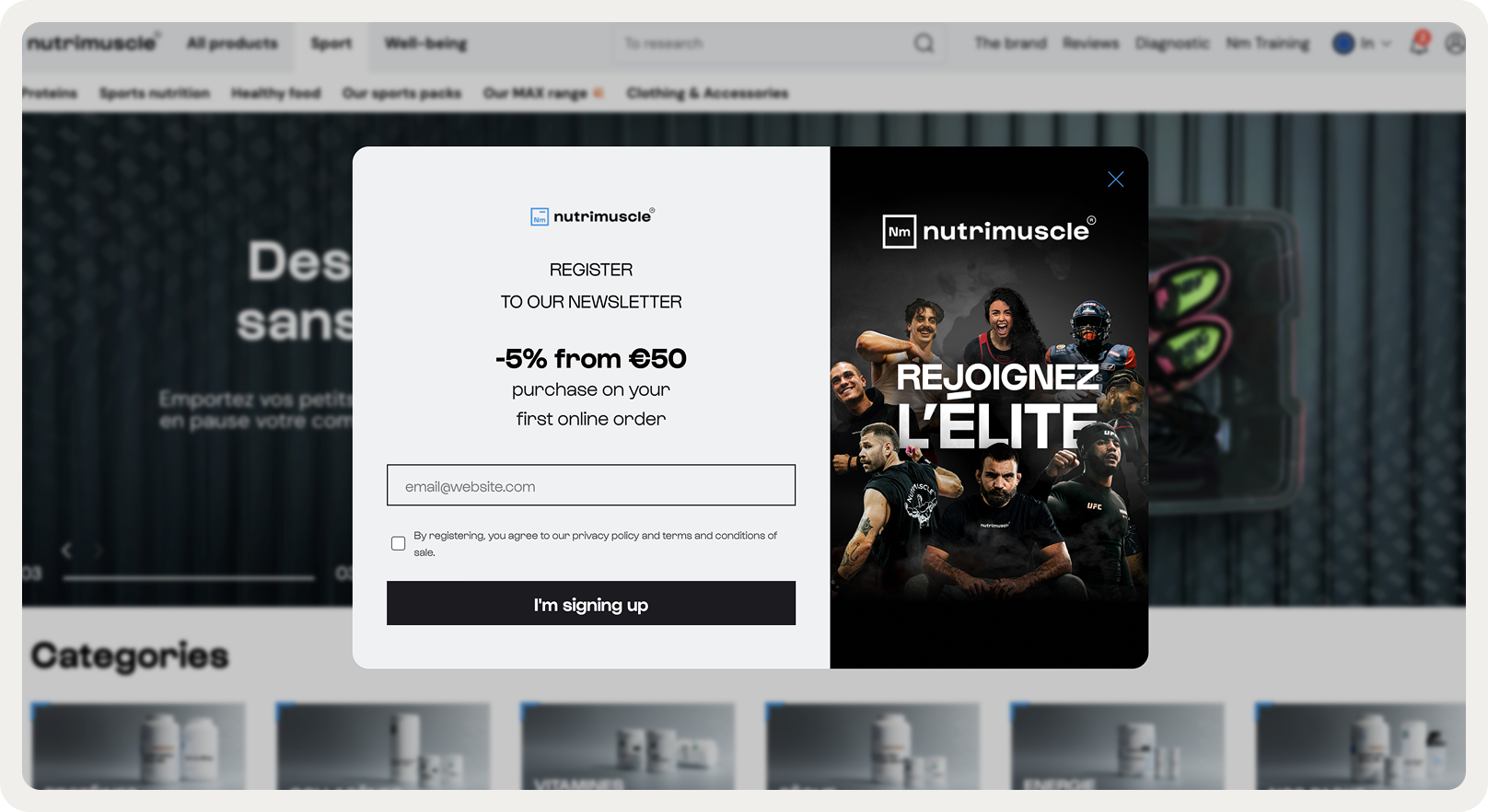
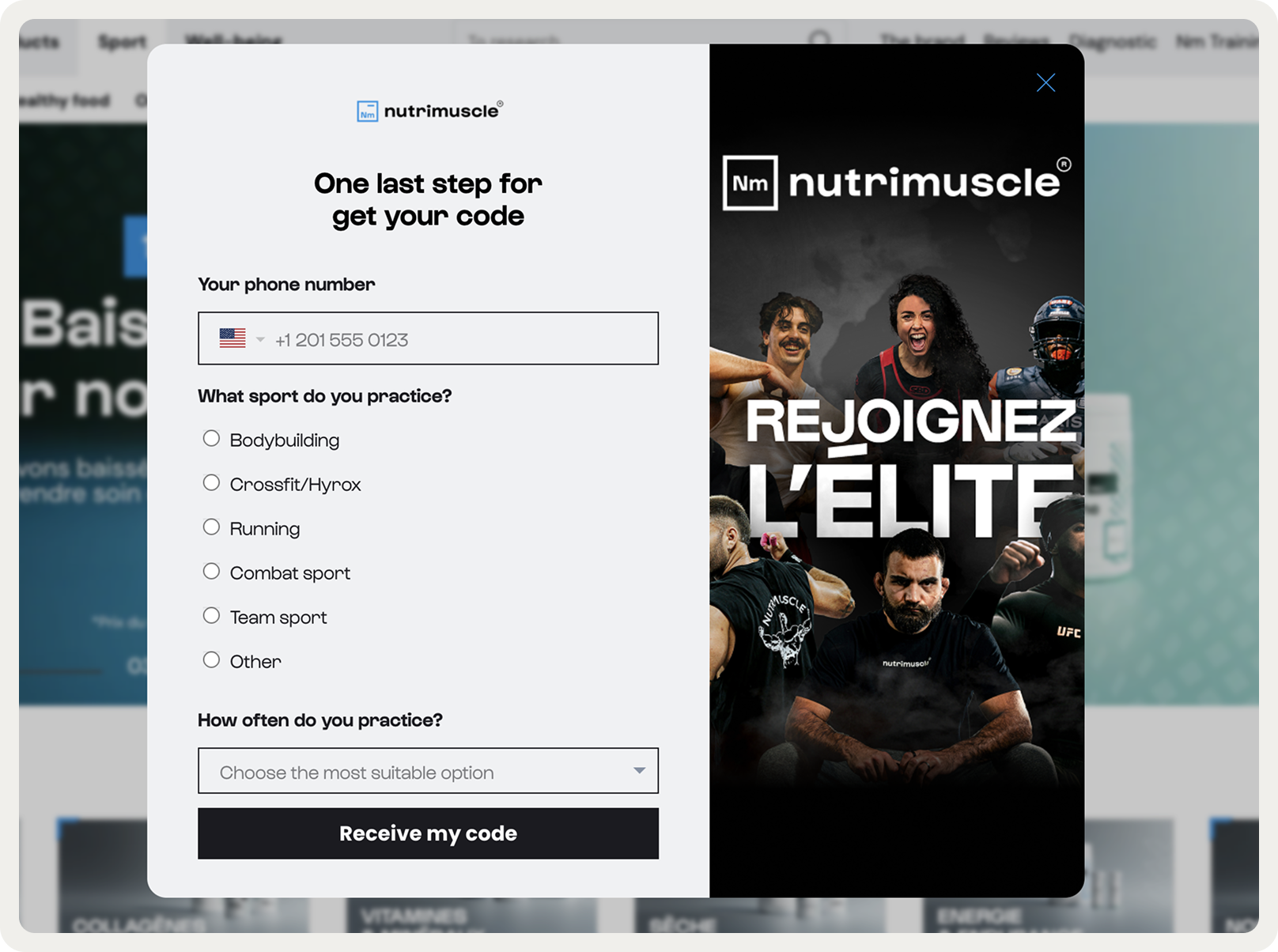
Nutrimuscle encourages new visitors to explore products by including three bestselling products in the last window of their lead generation popup. This campaign converted 4.1% visitors on average and collected valuable data like email and product preferences:
Expert tip:
Combine email capture and product recommendations in one popup to improve product discovery, lead generation, and sales.
Use Nutrimuscle's format:
Step 1: Collect emails. Display a benefit-driven copy emphasizing the main incentive (a discount, free item with order over $50, etc.)
Step 2: Collect the phone number / Survey customers. Request phone numbers (if applicable) as well as segmentation data to personalize your marketing emails
Step 3: Display the copyable code, allow to apply to the cart in one click, along with three bestseller recommendations. Generate a sense of urgency with an instant discount and add recommendations increase average order value
Cart-based product recommendation popup for upsell
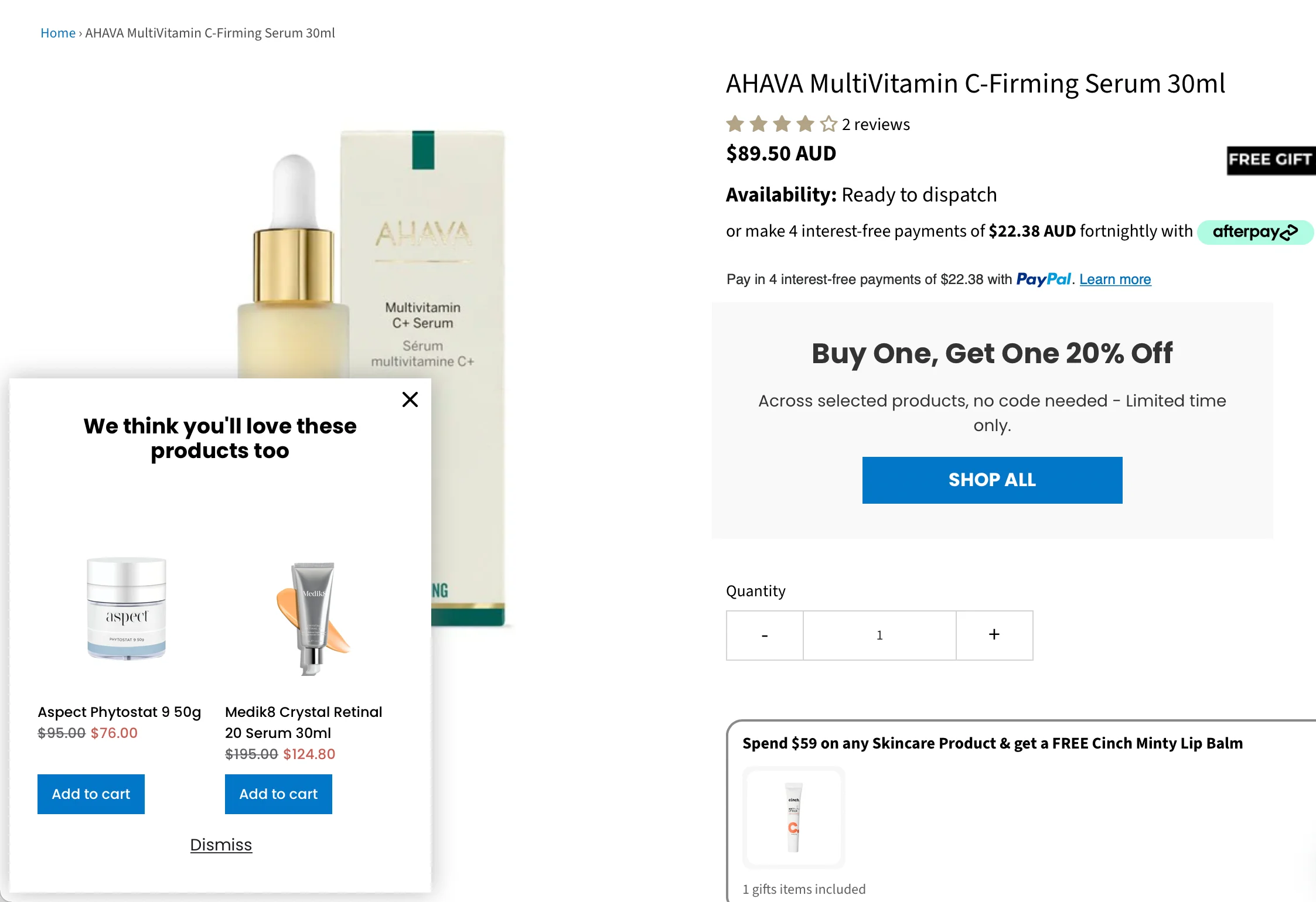
This AI recommendation popup on AbsoluteSkin triggers when a visitor adds at least one item to the cart but moves toward the close button. Rather than offering a discount, it recommends products related to what they've already added to the cart.
Only engaged visitors (5+ page views, 10+ seconds on site) see this upsell message. By showing complementary products (skincare items that pair together or accessories that match their cart), the popup helps recover carts while increasing AOV.
Expert tip:
Let visitors discover more of your products with product quiz popups
While quizzes aren't exactly product recommendations, they could be a powerful complementary strategy for product recommendation popups because they are interactive tools that give personalized suggestions.
Example:
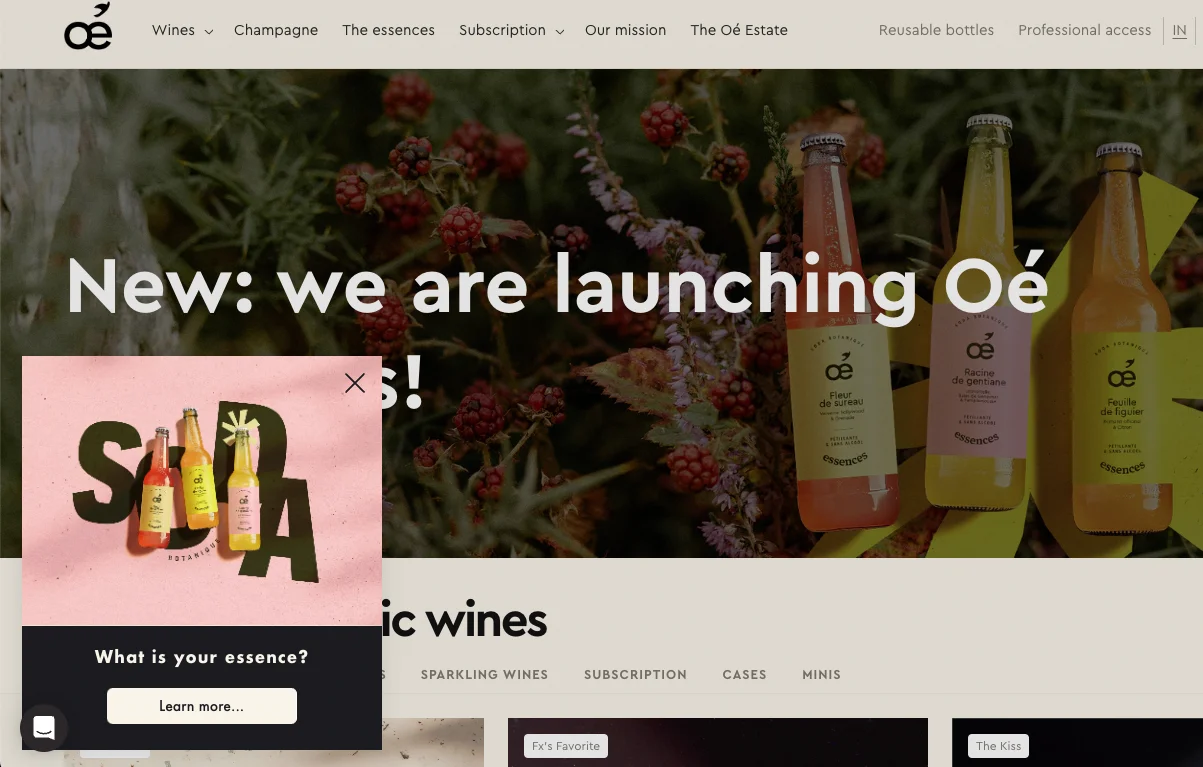
OE Wines uses a "What is your essence?" quiz popup on their homepage to route them to curated product recommendations based on their answers. This approach gathers preference data upfront, making downstream recommendations more relevant and increasing the likelihood of a conversion.
Exit-intent product suggestions popup
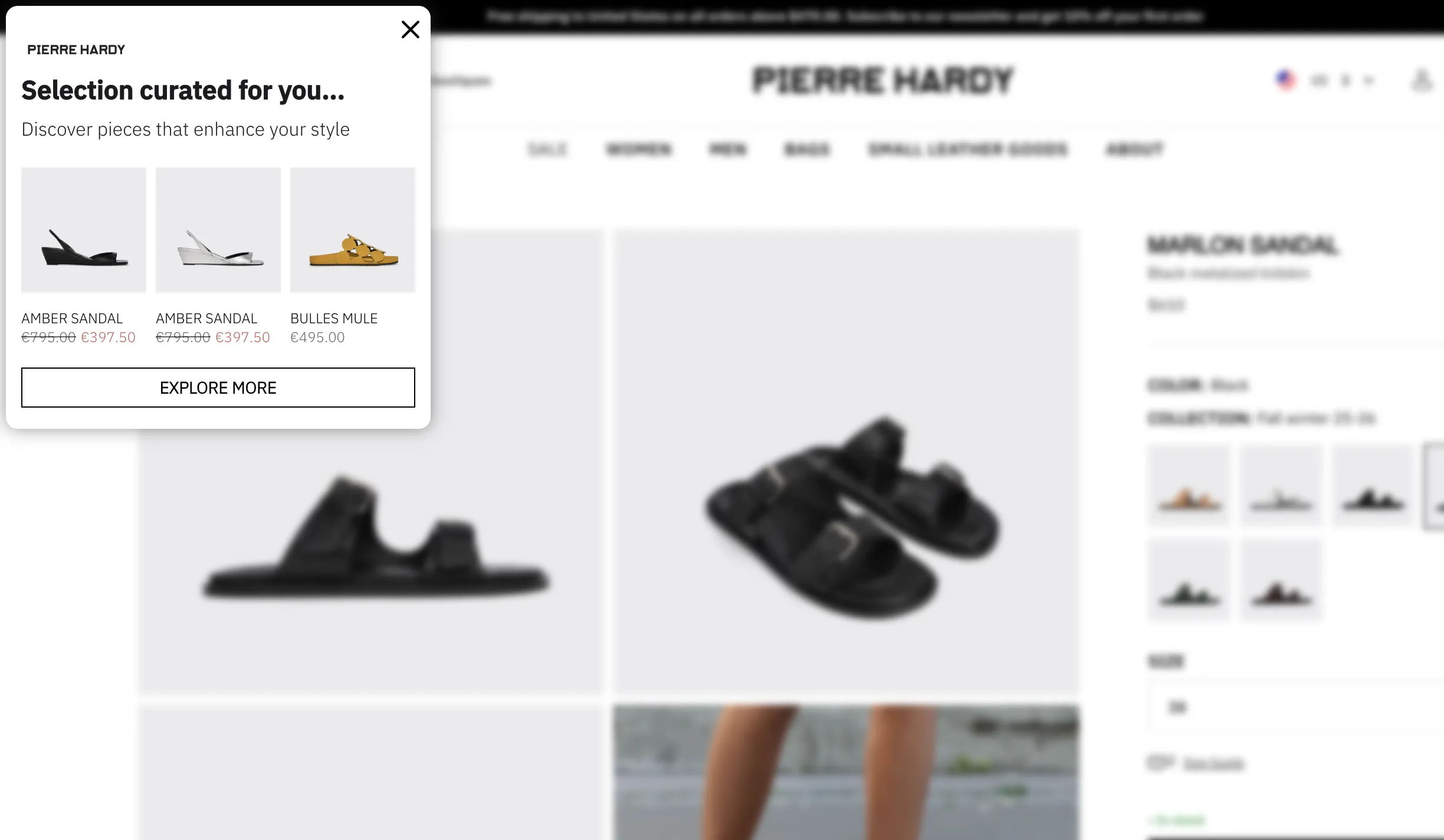
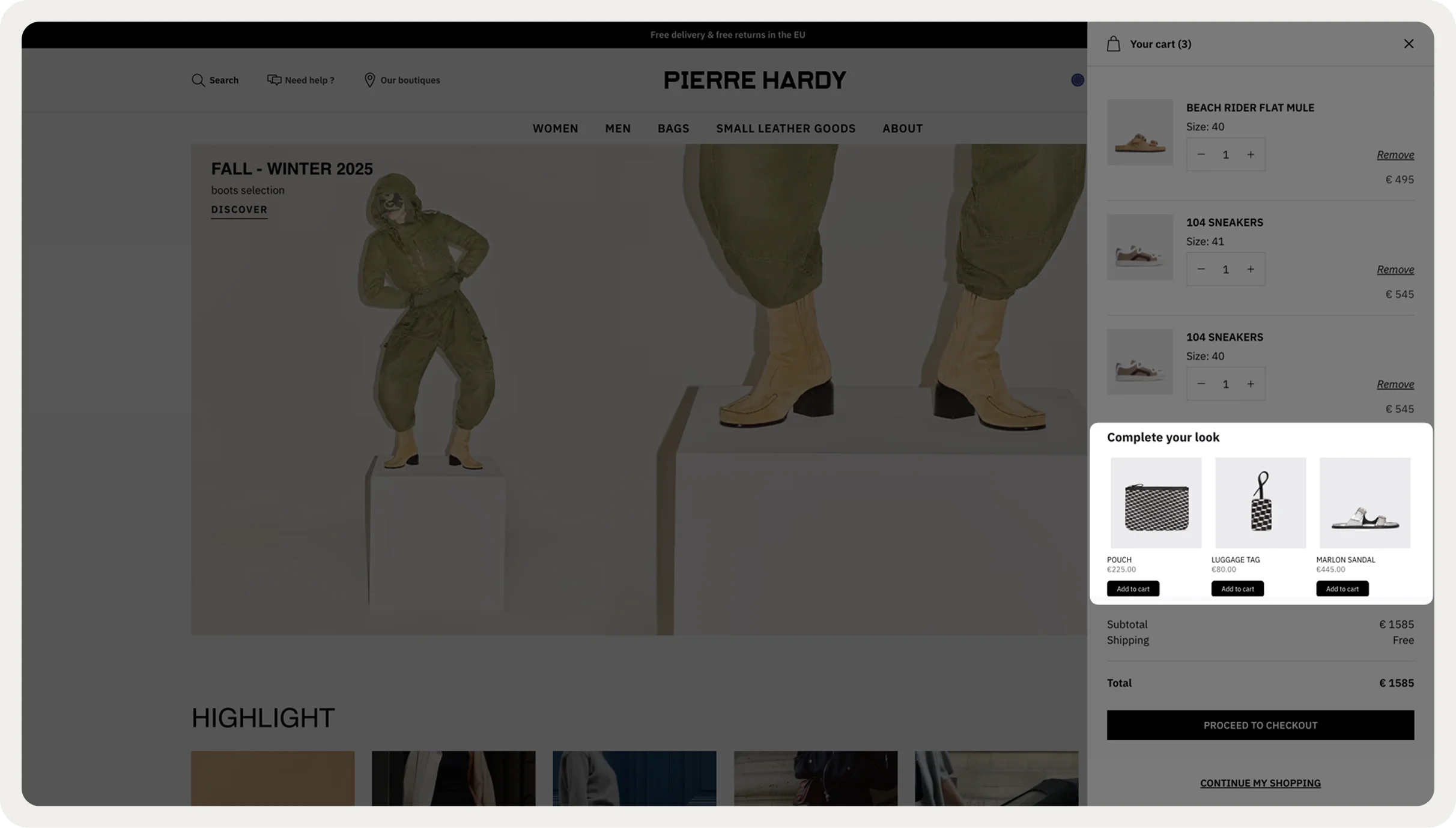
This product suggestion popup also triggers when a visitor's cursor moves to leave the website. And, just like AbsoluteSkin, it recommends a few products—but this time, they are based on the browsing history, not what the visitor added to the cart.
Choosing to display product recommendation popups on exit is not only one of the best practices for UX but also for luxury brands like Pierre Hardy. Since they want to preserve their premium image (which obviously doesn’t include intrusive onsite messages), the exit display fits that strategy because it doesn’t interfere with the actual shopping.
Complementary product upsell popup
This example recommends accessories or add-ons related to the item currently being viewed (think phone case for a phone, lens for a camera, batteries for a toy, etc.) The key feature of this product recommendation popup type is that complementary upsells need to be same-category enhancements rather than unrelated additions.
Example:
Aroma360, a luxury fragrance brand, uses a product recommendation popup featuring their Smart Car Diffuser to target visitors already browsing their main product category and pairs the recommendation with an exclusive discount ($10 off, limited time) to create urgency:

Bundle deal popup
Suggests pre-built or build-it-yourself bundles at a better value. This tactic works well for consumables, skincare routines, or related product sets where buying together makes logical sense.
Example:
MakerFlo, a crafting supplies retailer, promoted their custom bundles along with a 10% discount with a targeted popup shown only on high-intent product pages.
By limiting visibility to URLs where customers were already browsing bundle-eligible items with page-level targeting, they achieved a high 22.9% CTR and converted 14.7% of clickers into orders:

New arrival recommendation popup
This is a good way to highlight fresh inventory to repeat visitors or email subscribers. Best for fashion, beauty, or trend-driven categories where customers want to see what's new.
Example:
Blume, a self-care brand, promotes a new seasonal product with this beautiful popup shown to all visitors for maximum visibility:

Browsing-based product recommendation popup
This product recommendation popup triggers if a visitor views a product page URL or product category page URL without adding items to cart. The campaign will have those URLs added to page targeting options.
So, rather than waiting for customers to leave, this campaign activates mid-browse (also can be based on scroll depth or time on page) to nudge hesitant shoppers with a best-selling product from that category.
Example:
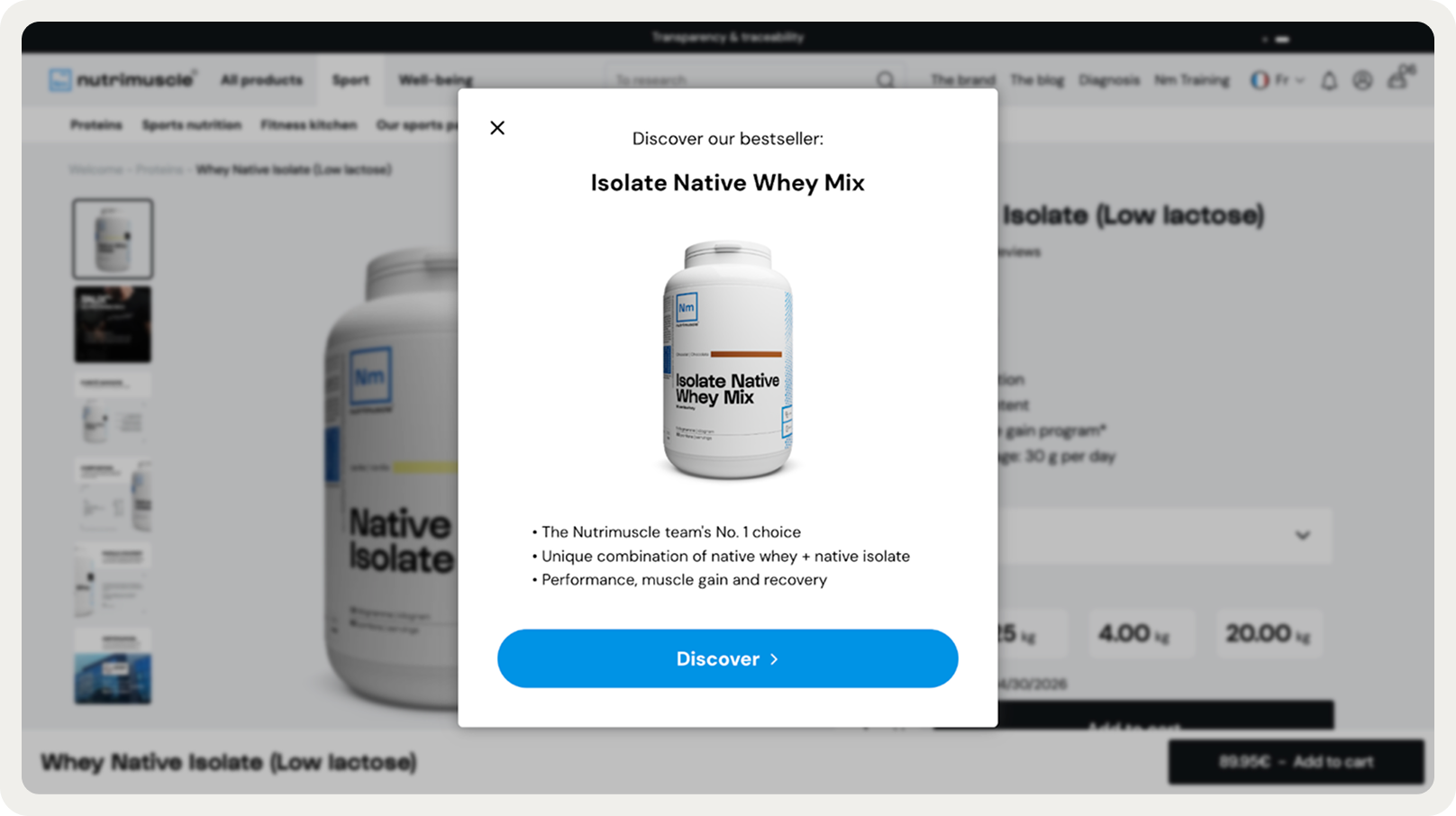
Nutrimuscle shows a bestselling whey protein powder along with some social proof (that’s a great idea for improving trust) when a visitor is browsing protein whey isolates:
Post-add-to-cart recommendation popup
Immediately after a visitor adds an item to their cart, this popup suggests a related product or multiple. This tactic lets you capitalize on a high-intent moment when they've already committed to buying.
Example:
Black Ember offers visitors to upgrade their product at a discounted price after they added it to the shopping cart:

Expert tip:
You can embed your popups into the cart addition confirmation for a more smooth shopping experience. Thanks to AI, they generate dynamic suggestions based on the item added to the cart.
Category page-based recommendation popup
Think of it as a helpful nudge for shoppers interested in a category but still searching for the right item. When a visitor browses a category page but doesn't click into a specific product, this product recommendation popup shows a curated suggestion.
Example:
Le Creuset recommends checking out a new collection of Dutch ovens to those browsing this product category:

Mystery product recommendation popup
This tactic builds anticipation by teasing a product without fully revealing it. Visitors must meet a threshold (minimum order value, add-to-cart action) to "unlock" the surprise—creating excitement while driving higher average order sizes.
Example:
CODAGE Paris, a luxury skincare brand, shows a mystery product popup to repeat customers. The bright yellow background creates visual intrigue, and the messaging ("our latest innovation”) makes the offer quite compelling:

Product restock recommendation popup
This tactic is designed to re-engage visitors who previously showed interest in an item that was out of stock. Ideal for product pages or during repeat visits, where intent signals clearly point to a single, high-interest product.
Example:
Dolce & Gabbana used a small bottom-right popup to announce the restock of their The Kim T-shirt. The campaign automatically triggered for visitors who had viewed the product before, effectively turning the restock alert into a personalized product recommendation:

Geolocalized product recommendation popup
If you’re running an ecommerce store selling in multiple countries, localizing your popups is a must. That, first and foremost, means writing a copy in the local language.
Example—
Nutrimuscle, a French sports nutrition brand, geolocalized their popups to show different campaigns depending on whether visitors were browsing from France or the rest of Europe.
Here’s the French campaign:

More inspiration:
How to create a product recommendation popup
Creating any type of product recommendation campaign takes about 30 minutes with most popup platforms.
Let’s build a “You might also like” campaign and delay it until the 6th visited page to give the system more time to learn about the visitor’s preferences.
Follow these 6 steps to add product recommendations on Shopify and other ecommerce platforms in about an hour:
Define your goal
Choose a product recommendation popup template
Customize your popup design
Select products to recommend
Set timing and trigger rules
Launch and track performance
Before we begin, choose your popup platform to build the campaign.
In this tutorial, I’ll use Wisepops—it includes AI product recommendations, deep behavioral and native Shopify targeting, and high-quality templates. Also, it’s rated 4.8 on Shopify and 4.9 on Capterra.
If you’d like to follow along, get a free account:

No cc needed, free access for 14 days. See 30 campaigns made with Wisepops

Step 1: Define your goal
Your goal determines which popup type and placement to use. We chose a “You might also like these” kind of campaign, but what is your specific growth goal at the moment?
For example, do you want to improve the average order value or reduce cart abandonment?
Examples:
Email capture + sales: Use a time-delayed, multi-step welcome popup with a first-order discount and product recommendations in the last step
Average order value: Use cross-sell and bundle popups at cart addition to encourage larger purchases without discounting core products
Cart abandonment: Target abandoned carts with personalized product recommendations and urgency messaging to recover lost sales.
Step 2: Choose a product recommendation popup template
When you click New popup campaign in Wisepops dashboard, you’ll see the gallery with 160+ pre-made templates.
We can choose a template that has been specifically made for our purpose.
Go to Product recommendations category; there, I’ll choose one called Product Recommendations Nudge:

Step 4: Design your popup
Best design practices for customizing your product recommendation popup:
Branding: Use your brand’s font and colors
Item count: Add no more than three recommendations (more creates choice overload)
Placement: Choose the centered position (it consistently produces higher CTR than cornered)
Prices: Display product prices and discounts if relevant
Urgency: Add a countdown timer if you’re giving a discount
Copy: Highlight clear benefits, savings, or special offers instead of emotional appeals

Step 3: Select products to recommend
Click the section with product recommendations to start.
You have three main ways to go here:
Manual selection: full control but more manual work
AI recommendations: automated and easily adaptive
Tip: Most brands benefit from combining approaches. Use AI for scale and manual selection for strategic placements like category-based bestsellers where you have to focus on just a couple or a few items.
Let’s go with AI recommendations in this campaign.
Choose the recommendation type (in our case, it’s “Personalized picks”) and the number of recommendations to show (we’ll go with three).
Then, add product ids of the items you’d like the AI algorithm to consider, eg. id:4567890, id:4561193

Step 5: Set timing and trigger rules
As mentioned, the most common triggers for popup recommendation popups include time on page, scroll depth, exit intent, cart content, page URLs, or visitor segment. To let AI learn about each of your visitor’s preferences, let’s wait until they view 5 pages on your store.
In Display rules > Trigger, add 5 page and 5 second delay (meaning that the campaign will be displayed after 5 seconds on the 6th visited page):

Note: Check display rules in your popup template—in Wisepops, for example, all templates come with a pre-determined page and time delay.
Step 6: Launch and track performance
Monitor popup conversion rate, revenue attributed, and click-through rate in your platform’s analytics dashboard.
Separate CTR from actual revenue. Track clicks, conversions, and attributed revenue in the same dashboard to understand the whole picture
Monitor mobile vs. desktop metrics separately. Mobile visitors may convert differently than desktop, so expect different performance numbers
Benchmark against last month. Comparing against your own baseline rather than industry average is a good idea. For example, your 5% popup conversion rate is lower than average popup Shopify rate of 8.1% but it could matter a lot if it's up from 2.5% last month
Treat popups as part of your broader strategy. Product recommendation popups are one piece of your ecommerce CRO strategy; They can work better when reinforcing your emails, paid ads, or other campaigns.
FAQs about product recommendation popups
How do AI-powered product recommendations compare to manual product selection in popups?
AI recommendations scale automatically and adapt in real time, so you can personalize for thousands of visitors without manual work. Manual selection setup offers total control but demands regular updates. Most brands win by combining both: AI for scale (powering feed notifications and post-cart recommendations), manual for strategic moments (bestseller highlights, seasonal campaigns, etc.)
What's a realistic conversion rate for product recommendation popups?
Popups average a conversion rate of 4.65%, rising to 8.11% on Shopify stores. Targeting and personalization are what plays the most important role + goal and revenue tracking will help you understand the real impact of product recommendation popups on conversions and sales.
Which trigger and timing increase conversion for recommendation popups?
Our research says that 20-50 second delays outperform immediate popups which can be explained by the fact that visitors need time to explore the products. Exit-intent and scroll-depth triggers (50%+ down the page) also perform well because they signal genuine engagement better than time alone.
What copy elements boost popup CTR?
Action-oriented CTAs outperform conversational language by 60%+. Our research shows "Shop Now" and "Reveal Discount" beat "Learn More" or "See Details." Specificity matters: "Get 10% Off Protein Bundles" converts better than "Check Out Our Deals," for example. Scarcity- ("Limited time," "While stocks last") and social proof-based copy (eg. "4,000+ customers bought this") also improved conversion rates.
How to A/B test timing for recommendation popups?
Consider testing only one timing variable at a time. Run Campaign A with 20-second delay, Campaign B with 40 seconds and keep everything else identical. Run for at least one week: track CTR, conversion rate, and revenue per visitor. Once you find your winner, feel free to test the next variable (scroll depth, exit-intent, etc.).
Get started
in minutes
Start converting more visitors today.
Get started in minutes and see results right after.